
›

Resources

Automotive manufacturers & e-commerce sellers

Practical answers for your automotive business.

Create better product data, get it to market, and make your products easier to build and buy.

MANUFACTURERS & BRANDSHow do we get product information ready for sale?Create, check and distribute your product data from a visual PIM.Read the answer +

Start with a part number and brief description, or import information you already have in a spreadsheet. Build out descriptions, specifications, imagery, pricing and intended fitment in one product record.

Use AI assistance to develop content, review it in your own words, and use grading and completeness scores to identify remaining work. When a product and part type are established, clone the record and edit the differences for similar products.

Alphard PIM product overview with imagery and quality scorecard
Product information and its quality breakdown appear together. This is an example product record. Select the image to open a larger view.
PARTS RETAILERS & E-COMMERCEHow do we turn supplier files into a store that is easy to shop?Organize the catalog around your customers, then keep it current.Read the answer +

Manufacturers may use different category names for the same part type, while basic descriptions can leave shoppers unsure whether a product suits their needs.

  1. Organize: Create your own categories and map supplier categories or part types into them.
  2. Improve: Use available product specifications and fitment to develop useful descriptions with AI assistance, then review and approve the copy.
  3. Preserve: Control which supplier updates replace information and which retain your edits, in bulk or by product.
  4. Maintain: Select a preferred supplier for pricing and availability and monitor updates in the customer dashboard.

For product discovery on Shopify and BigCommerce, explore Alphard YMM, Guided Search & Filters.

Explore by audience and task

Product data, production and online selling.

MANUFACTURERS / GETTING STARTEDDo we have to prepare every product from scratch?Start small, import existing work, and clone similar products.Read the answer +

No. Begin with a part number and brief description, or upload a spreadsheet containing the information you already have. Refine the record in the PIM rather than rebuilding your existing work.

Once a product and its part type are created, duplicate it for similar products and change the details that differ. Review specifications, imagery and intended fitment for each product before distribution.

MANUFACTURERS / CONTENTHow can AI help us write useful product descriptions?Use your product information as the starting point, then review the result.Read the answer +

The manufacturer supplies imagery, intended fitment and available product details. Alphard’s AI tools draw on that information to help create marketing content your team can edit and customize.

You can request copy structured using AEO best practices, including a clear product summary, questions and answers, intended uses, key specifications and fitment explanations.

Review the copy for accuracy and usefulness before approving it. The manufacturer remains responsible for supplying and verifying the product’s intended application.

MANUFACTURERS / DATA QUALITYHow do we find missing or incomplete product information?Use the score breakdown and work through products grouped by issue.Read the answer +

The PIM displays a quality scorecard covering descriptions, pricing, digital assets, attributes, fitment and packaging. It groups products by issue so your team can address missing content and corrections efficiently.

A well-developed product can still have gaps. In this example, the scorecard identifies packaging as partially complete, and the packaging tab shows the fields that need attention. Use the score and validation status as review tools alongside your product knowledge.
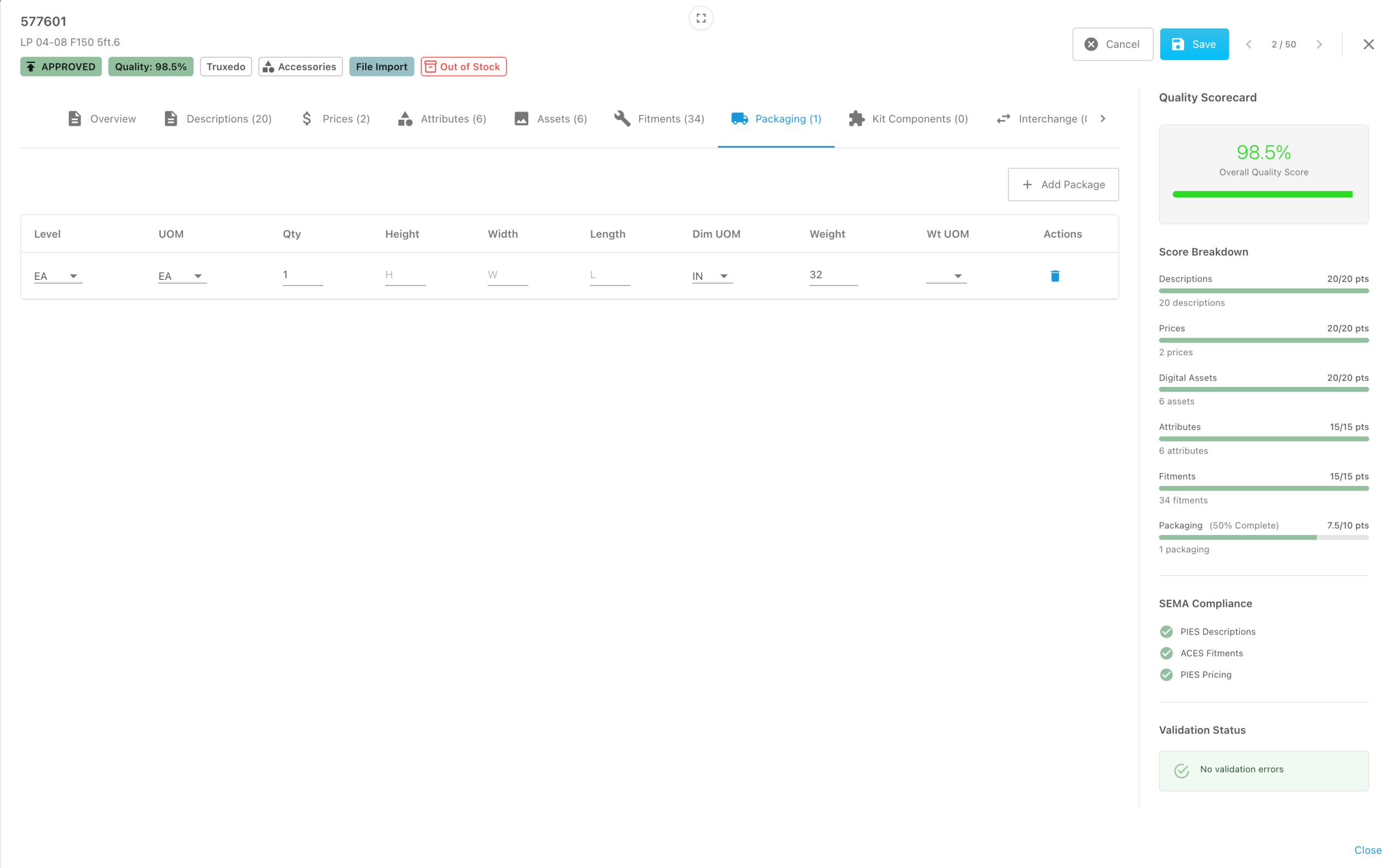
Packaging fields with missing dimensions and a partially complete packaging score
The packaging tab and scorecard make an incomplete section visible. Select the image to open a larger view.
MANUFACTURERS / DISTRIBUTIONHow do we send data to different distributors and retailers?Choose the products, fields and output each recipient needs.Read the answer +

The Smart Export Wizard lets you select the full catalog, brands, categories, specific part numbers or fitment data. Choose the fields to include, configure the output and preview it before exporting. Save the configuration as a reusable template.

Outputs include PIES XML, ACES XML, a combined ZIP package, Shopify and BigCommerce product CSVs, and custom CSV files.

Alphard can also host client files on its SFTP server and distribute them to authorized recipients on the client’s behalf.

Smart Export Wizard destination options including ACES, PIES and store CSV formats
Select an output for the intended recipient and delivery workflow. Select the image to open a larger view.
MANUFACTURERS / CONNECTED STORESCan we update a connected store without uploading files?Authorized users can push updated data into Shopify and BigCommerce.Read the answer +

Yes. Authorized users can push updated product data directly into connected Shopify or BigCommerce stores they own or are connected to. Manual file uploading is not required for that workflow.

File exports remain available for recipients who need them. Choose the products and information appropriate for the recipient rather than sending every field to every destination.

MANUFACTURERS / PRODUCTIONHow do we help new assembly employees follow the approved process?Put visual instructions, materials and quality checks at the workstation.Read the answer +

The operator enters or scans a part number to load the current materials and approved assembly instructions. They verify component quantities against the visual bill of materials before beginning assembly.

Numbered steps combine reference photos or video with written instructions and quality checks. Operators mark steps complete, enter required measurements, attach optional photo evidence or flag an issue. Supervisors can track job progress.

Instruction changes are revision-controlled and require approval. Each job records the version used. The completed build includes its revision, workstation and elapsed time, with a traceability QR code and downloadable build PDF.

Visual bill of materials with verified components before assembly
Verify materials and quantities before beginning the assembly sequence. Select the image to open a larger view.
Assembly step with required measurement and quality check
Record measurements and quality checks within the assembly workflow. Reference-media areas in this example contain placeholders. Select the image to open a larger view.
RETAILERS / CATEGORIESHow do we avoid duplicate or confusing supplier categories?Map different supplier names into a category structure your customers understand.Read the answer +

Create the store’s category structure around how your customers shop. Map each supplier’s categories or part types into that structure and reuse those mappings on later imports.

For example, suppliers may use different names for the same type of part. Map those products into one consistent store category rather than creating another category each time a new file arrives. A product can appear in multiple customer-facing categories where that is useful.

RETAILERS / CONTENTCan we improve basic supplier descriptions in bulk?Develop useful copy from the available product data, then approve it.Read the answer +

Yes. Alphard’s AI tools can use supplier specifications, fitment and other available product information to help improve basic descriptions. Work in bulk or on an individual product, review the suggested content, and approve it before sending it to your store.

Focus the description on what the product does, verified features, intended uses and application details that help a shopper make a decision.

RETAILERS / UPDATE CONTROLWill the next supplier update overwrite our work?Choose what gets replaced and what you preserve.Read the answer +

Alphard lets you control which information supplier updates replace and which retains your own edits. Apply those choices in bulk or by product.

This allows you to maintain improved descriptions, custom categories and product relationships while continuing to receive supplier information. Decide which fields should follow the supplier and which should remain under your store’s control.

RETAILERS / PRICINGHow does supplier pricing become our website price?MAP first; otherwise use retail or your cost-based factor.Read the answer +

Retailers typically choose a preferred supplier and pull that supplier’s pricing and availability.

  • MAP available: MAP is presented as the website price.
  • No MAP, but retail available: The store owner chooses retail or a price calculated from cost using their factor.
  • Only cost available: The website price is calculated from cost using the store owner’s factor.

Your pricing choices determine how supplier data becomes the displayed selling price. See Alphard Sync for the application workflow.

RETAILERS / AVAILABILITYHow do we keep track of supplier updates?Use a preferred supplier and review activity in the customer dashboard.Read the answer +

Choose a preferred supplier for pricing and availability. Combining available stock is also an option.

The customer dashboard helps you keep track of updates and items needing attention. Alphard Sync includes views for mapped products, items needing mapping, source conflicts, sync activity and logs.

See the Alphard Sync application views for examples of the screens used to manage this work.

RETAILERS & DIRECT-SELLING BRANDSHow can shoppers find the right parts or build a package?Use vehicle search and filters, with guided shopping on the enterprise plan.Read the answer +

Alphard YMM, Guided Search & Filters supports product discovery on Shopify and BigCommerce through vehicle selection, search and filters.

On the enterprise plan, Alphard can help the store owner build a guided shopping experience. This is typically suited to manufacturers selling their own products online because they have the detailed product and compatibility information needed to define the choices.

Manufacturers can define accessories, required companion parts, replacements and alternatives, and include those relationships in exports or connected-store updates.

Explore Alphard YMM, Guided Search & Filters →

A practical first step

Let’s simplify your workflow.

Tell us what slows your team down. We’ll help you find a practical next step.